
Tidbyt
Tidbyt, IncHouse & Home
3.953.00 Reviews
- Version
- 1.353.94
- Installs
- 10.00K
- Age Rating
- Everyone
Screenshots
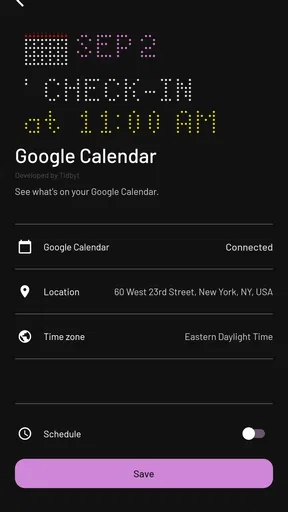
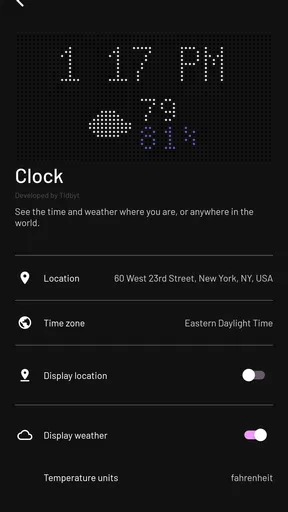
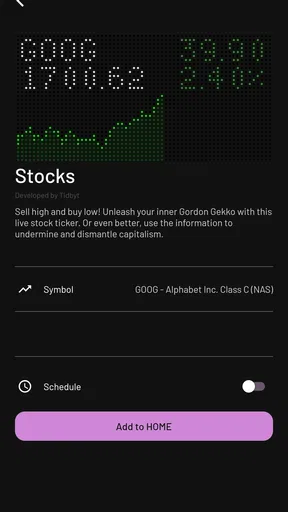
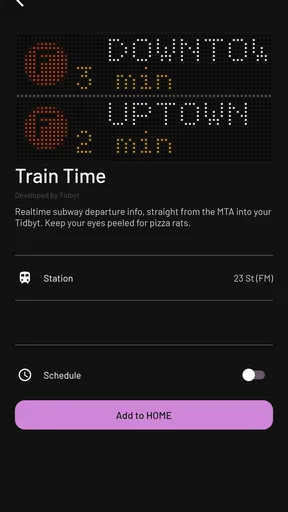
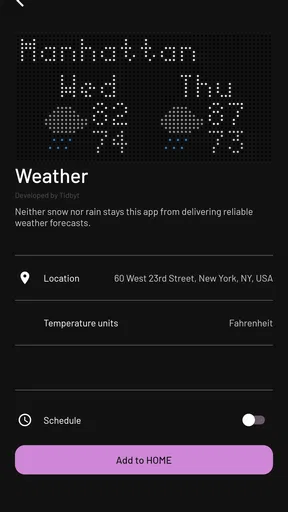
Our Review of Tidbyt
 Analysis by Appyee
I like home apps that solve one small problem well, and Tidbyt is built around a simple idea: put useful information somewhere visible instead of making me reach for my phone every time. It belongs to the House & Home category, comes from Tidbyt, Inc., and is free to install. In my experience, its value depends less on how many options it offers and more on whether a glanceable display fits naturally into your routine.
The app is connected to the Tidbyt ecosystem, so it makes the most sense when you have the company’s companion display available. Rather than treating the phone as the final destination, it helps turn a separate screen in the home into a place for selected information. That distinction matters. This is not a general smart-home controller, a full household dashboard, or a replacement for every notification app. It is a way to decide what deserves a quiet, persistent place in your surroundings.
I found that approach particularly useful for people who dislike constant phone checking. A display in a kitchen, hallway, office, or shared living space can make information easier to notice without opening an app, unlocking a device, or searching through notifications. At the same time, the experience is only as clear as the physical display, the chosen content, and the environment where it is placed. The strongest part of Tidbyt is its glance-first concept, not the phone app by itself.
How Tidbyt handles readability and navigation
The phone side of Tidbyt is mainly a setup and management tool, while the physical display is where the result is meant to be seen. That division gives the product a different rhythm from ordinary home apps. I do not open it repeatedly to read everything; I use it to shape what appears elsewhere, then rely on the display for quick checks.
That can be easier than a dense phone dashboard for someone who wants a small amount of information at a time. A dedicated screen has less visual competition than a phone filled with messages, badges, and unrelated alerts. If you place it where you naturally pass by, the act of checking can become almost automatic. For example, I can imagine using it near the front door for a last look before leaving, or in a home office where a quick glance is less disruptive than switching between work and personal apps.
Readability is still highly dependent on distance and surroundings. Tidbyt’s usefulness is not the same as reading a large tablet or a phone held close to the face. If the display is across a room, small details may be less comfortable to interpret, especially for someone with reduced vision. I would position it at a natural stopping point rather than assuming it will work as a room-wide information board.
The best setup is selective. Showing too many changing items can turn a calm glanceable display into a stream that requires waiting and remembering. I prefer choosing information that answers one practical question quickly: what is happening now, what should I remember before leaving, or what is worth noticing during the day. This is one of the less obvious trade-offs of the system: more content can sound more useful, but a shorter rotation is often more accessible.
Navigation on the phone should feel manageable for ordinary setup tasks, but the physical display means that not every interaction happens through a touch interface. That can be an advantage for people who find repeated phone navigation tiring. It can also create a limitation if a user expects to control every detail directly from the display. The phone remains important for configuration, so anyone who wants a completely screen-free setup should look elsewhere.
The app is available for devices running Android seven or later, which keeps it within reach of many older Android phones. Its current version is 1.353.94, so keeping the app updated is sensible when managing a connected home product. I would still check the phone experience personally if navigation is a major concern, because comfort depends on the handset, operating-system settings, and the user’s preferred text size or contrast settings.
Choosing information that stays readable
A practical approach is to begin with one display purpose instead of trying to build a miniature command center. If the goal is a morning check, select information that can be understood while standing and moving. If the goal is household awareness, avoid filling the screen with details that require close inspection. The display works best when its message is recognizable before every word is read.
This also helps people with attention-related or cognitive accessibility needs. A limited, predictable set of information can reduce the effort of deciding where to look. It is not a substitute for personalized accessibility tools, but it can remove one layer of friction: the information is already in the room rather than hidden behind several app steps.
Motor, sensory, and everyday-use considerations
Tidbyt can reduce the need for repeated phone handling, which is meaningful for anyone who finds tapping, swiping, or holding a phone uncomfortable. Once the display is arranged, checking it may require only a glance. That is a real strength for short moments when hands are occupied, such as cooking, carrying laundry, or preparing to leave home.
However, setup still involves a phone and the physical arrangement of the display. People with limited dexterity may find the initial configuration or later changes less convenient than a purely voice-based system. The app’s value grows after the setup work is complete, but that does not erase the effort required to decide what to show and where the device should sit.
For sensory needs, a separate display can be calmer than a phone that vibrates, lights up, and mixes many unrelated alerts together. The user chooses to look rather than being interrupted by every update. I see this as especially helpful in a shared home where constant notification sounds would be distracting or stressful.
There is an important exception: a visual display is not automatically accessible to someone who cannot rely on sight. Tidbyt should not be treated as a replacement for spoken announcements, tactile cues, or other nonvisual systems. If essential information must reach a person who may not see the display, another channel is needed. The app can complement those tools, but it should not carry safety-critical communication on its own.
Color and visual motion can also affect comfort, depending on the content and the surrounding light. I would avoid placing the display where glare makes it difficult to read or where changing visuals become a distraction. A quieter location with a clear viewing angle is more useful than a prominent spot that looks attractive but forces people to squint or walk closer.
For households with different abilities, placement becomes a shared design decision. A display that works for a standing adult may be poorly positioned for someone seated, using a wheelchair, or viewing from another part of the room. Before committing to one location, I would test it from the places where different household members actually spend time. That simple check is more valuable than assuming one “central” position works for everyone.
A realistic home scenario
Imagine a household that keeps a Tidbyt display near the kitchen entrance. One person is preparing breakfast, another is getting ready for work, and a third wants a quick update without opening a phone. The display can act as a shared visual point, allowing each person to glance at the same chosen information while moving through the room.
The benefit is not that it replaces conversation or a calendar. The benefit is that it can reduce small interruptions. Someone with limited hand mobility may not need to pick up a phone for every quick check. Someone who is sensitive to notification noise may appreciate information that waits silently. Someone with attention difficulties may find a fixed location easier to remember than a buried app.
But the same scenario exposes the limits. If one person needs large, high-contrast information and another wants a broader stream of updates, the household must compromise. If the display is too far away, the person who most needs it may be excluded. If the content changes too quickly, nobody gets a complete answer. Tidbyt supports shared awareness, but it does not remove the need to design the setup around real people.
Where situational access works best
Tidbyt is most convincing in situations where the phone is inconvenient rather than impossible to use. In a home office, it can provide a quick visual cue without pulling attention into a personal device. In a kitchen, it can be easier to glance toward a fixed screen than touch a phone with wet or messy hands. Near an entrance, it can support a repeatable leaving-home routine.
It may also suit people who are trying to create boundaries around phone use. A phone is designed to offer endless alternatives, while a dedicated display can be limited to the information chosen for that space. That physical separation is useful when the goal is to check one thing and continue with the task at hand.
For visitors or family members who do not use the same phone, a shared display may be more approachable than asking everyone to install and learn another app. The display can become part of the room rather than another private account or notification stream. Still, I would be careful about showing personal information in a shared location. A visible screen should be treated as public within the home, even if the phone used to configure it is private.
People who have trouble remembering where information lives may benefit from the fixed placement. The display creates a physical cue: look in this one place for the selected update. That can be more dependable than relying on a phone notification that disappears into a crowded lock screen.
On the other hand, Tidbyt is less suitable for users who need detailed interaction while away from home. A conventional phone app is better when the task involves searching, editing, reading long text, or responding immediately. Tidbyt’s glanceable format is a strength for brief awareness and a weakness for extended work.
It is also not the best choice if a household wants one system to manage every smart-home function. A dedicated home-control platform may be more appropriate for lights, locks, cameras, heating, routines, and device automation. Tidbyt occupies a narrower space: presenting selected information in a way that feels separate from the phone.
How it compares with ordinary alternatives
The usual alternative is simply checking a phone. That option is cheaper if you already own one and more flexible for detailed information, but it demands unlocking, navigating, and resisting unrelated distractions. Tidbyt trades that flexibility for presence. The information is already waiting in a particular place, which can be more convenient for repeated, low-effort checks.
A tablet or smart display offers a larger interactive surface and may be better for reading, touch controls, video, or household accounts. It can also be more demanding, with more menus and more opportunities for distraction. Tidbyt feels more focused, but its smaller, glance-oriented presentation means it cannot serve as a universal replacement.
Paper notes and a wall calendar remain strong alternatives for fixed reminders. They do not need updates, charging, or an app, and they can be easier to customize for large handwriting. Tidbyt becomes more compelling when the information changes or when a household wants a digital display that can be adjusted without replacing the physical note.
Voice assistants are often better for people who cannot comfortably read a visual display or who need hands-free answers. Their weakness is that spoken information may be missed in a noisy room or may not suit everyone’s sensory preferences. Tidbyt offers quiet visual access, while voice tools offer nonvisual interaction. For some homes, the most inclusive arrangement is using each for a different kind of need rather than forcing one product to do everything.
Remaining barriers before you choose it
The first barrier is that the app’s usefulness is tied to compatible hardware in the Tidbyt setup. Installing a free app does not by itself create the full experience. Anyone considering it should think about the total arrangement: the display location, the viewing distance, who will configure it, and whether the household actually wants information presented in a shared physical space.
There is also a cost consideration beyond the free download. In-app purchases are listed at $4.99 per item, so I would review any optional content or functions carefully before building the setup around them. The free entry point is appealing, but the long-term value depends on whether the features you want fit your budget and routine.
The app has an average rating of 3.9 from around ninety ratings, with over fifty written reviews, and it has passed ten thousand installs. Those figures suggest a real but relatively small user community rather than a universally established household standard. I would interpret that as a reason to set practical expectations: Tidbyt may be a good fit for a specific workflow, but it is not necessarily the safest choice for someone who needs a mature, all-purpose accessibility platform.
Its Everyone age rating makes it suitable as a general household app, but age suitability is not the same as independent usability for every person. A child, older adult, or person with a disability may still need help choosing content, positioning the display, or understanding what the changing information means. The product can support shared routines, but inclusive use may require one person to handle the technical setup.
Another barrier is the risk of overloading the display. A user may start with a clear purpose and gradually add more items until the screen becomes harder to interpret. My advice is to treat every addition as a question: does this help someone act or decide at a glance? If the answer is no, it probably belongs on a phone, tablet, paper note, or another tool.
Privacy deserves attention too. A display in a common area can be seen by everyone nearby. I would avoid using it for information that could embarrass someone, reveal private details, or cause confusion when viewed out of context. The convenience of shared visibility should never be mistaken for private communication.
Finally, the app is not a complete answer for high-stakes reminders. If missing an update could create a medical, safety, or time-critical problem, I would use a dedicated alert method as well. Tidbyt is best for awareness and routine, not as the sole safeguard for something that must reach a person reliably.
My inclusive verdict on Tidbyt
I recommend Tidbyt to people who want a calm, physical way to surface selected information at home and who appreciate reducing unnecessary phone interaction. Its most inclusive quality is the separation between checking information and handling a phone: a glance can be quicker, quieter, and less demanding than navigating a busy device.
I also think its accessibility depends heavily on thoughtful setup. Choose a location that works from different heights and seats, keep the displayed information focused, consider glare and distance, and do not assume visual access works for everyone. Those decisions determine whether the product becomes genuinely helpful or simply another screen in the room.
For someone who needs large, detailed text, voice interaction, tactile feedback, or a full smart-home control center, I would choose a different primary tool. A tablet, voice assistant, paper system, or dedicated accessibility solution may be more appropriate depending on the person and task. Tidbyt can sit alongside those options, but it should not be asked to replace them.
The app is free, supports Android seven and later, and comes from Tidbyt, Inc., with a current version of 1.353.94. Its appeal is narrow in a good way: it encourages a home display that shows what matters without demanding constant attention. If your goal is quiet, shared, glanceable information rather than deep interaction, Tidbyt is worth considering; if your goal is universal access from one device, it will feel limited.
Verdict
Strengths of Tidbyt
- Customizable pixel-art displays for weather, news, calendars, and more.
- Large community library offers many ready-made apps and widgets.
- Open-source platform supports creating and modifying custom displays.
- Compact hardware uses little power and works well as desk decor.
- Notifications and information are visible at a quick glance.
Limitations of Tidbyt
- Requires separate Tidbyt hardware, making the overall cost relatively high.
- Pixel graphics limit readability for detailed text and complex information.
- Some integrations need technical setup or third-party account permissions.
- Limited display size means only a small amount of content appears at once.
- The mobile app is mainly a companion and cannot replace the physical display.
Similar Picks in This Category
View All
Universal TV Remote Control
CodeMatics Media Solutions3.9

AlfredCamera Home Security app
Alfred Systems Inc.4.7

Planner 5D: AI Home Design
Planner 5D4.5

Universal Tv Remote-Cast to TV
One Music Player4.1

Zillow: Homes for Sale & Rent
Zillow Group4.8

99acres Buy/Rent/Sell Property
infoedge.com4.3
Frequently Asked Questions
What is Tidbyt, and what can I use it for?
Tidbyt is a small, retro-style smart display that shows useful information through customizable pixel-art apps. After connecting it to the Tidbyt mobile app, you can display weather forecasts, calendars, clocks, sports scores, news, transit updates, cryptocurrency prices, and other services. It is designed more as an ambient information screen than as a full-featured tablet or notification center.
Is the Tidbyt mobile app free to download and use?
The Tidbyt app is generally available to download for Android and iOS at no additional cost, but it is intended to control Tidbyt hardware. You may browse available displays, configure apps, manage settings, and connect the device through the application. The physical Tidbyt display must be purchased separately, and certain integrations or services may depend on their own accounts, subscriptions, availability, or regional restrictions.
How do I set up Tidbyt with the mobile application?
Setup is completed through the Tidbyt app and normally requires a compatible smartphone, an internet connection, and access to a Wi-Fi network. After signing in or creating an account, the app guides you through pairing the display, selecting your network, and choosing the apps or information you want to show. The process is fairly straightforward, although Wi-Fi permissions and network credentials may be required.
What information and services can Tidbyt display?
Tidbyt supports a broad selection of small, pixel-based apps, so the available information can include local weather, time zones, calendars, reminders, package tracking, public transportation, sports results, headlines, music-related data, and smart-home information. The exact catalog can change over time, and some services may require linking an external account. Display layouts are intentionally simple because the screen is optimized for quick glances.
Does Tidbyt work without Wi-Fi or a phone after setup?
Tidbyt relies on an internet connection to receive updated information and normally connects through Wi-Fi rather than operating as a completely offline display. The phone is mainly used for initial setup, configuration, and management, so it does not need to remain connected constantly. However, if the network goes offline, live content may stop refreshing, and changing displays or settings will require the mobile app once connectivity is restored.
